Data Relation System
This feature is also known as the sub-query or sub-data source system. Databases almost always contain master/detail relations between tables. When you define reports for typical documents such as invoices or orders, at least one header record and its related detail data are used, linked by a primary key and a foreign key. The goal of the data relation system is to update child data sources at runtime, row by row, driven by a parent data source. This works through an ID column that is the primary key of the parent and the foreign key of the child. Data source relations are very useful for SQL data sources, where the data is fetched from database tables with an SQL command, and for Item Model data sources, where you manage the data source content from code.
|
The data source relation system currently works only for the SQL data source and the Item Model data source. The other data source types are not supported by this feature. |
The following example shows a three-level parent/child structure.
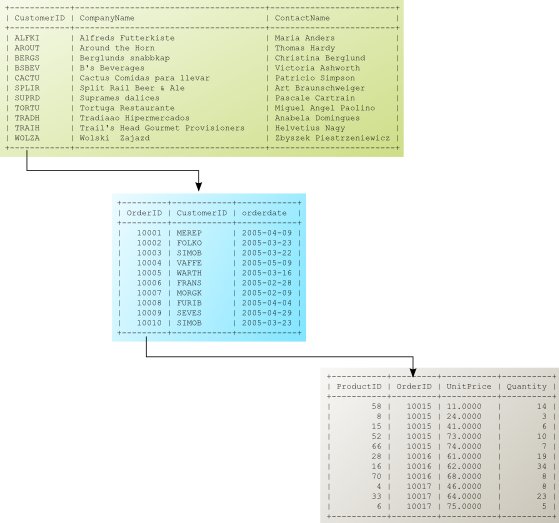
The next sections show how to define the data sources of a master/detail relation, using a three-level data source relation as an example.
Defining a parent data source
You can add the master data source in the data source settings dialog. In the Designer, select and add a new SQL data source. Set the Opening/running role to Beginning of the report. This means that the query is executed only once, at the beginning of the report. Type the data source ID, set the connection properties, and edit the SQL query in the SQL editor text box.
This is the master query of our Northwind database example (data source ID: customers), which queries the customers:
SELECT customers.CustomerID, customers.CompanyName
FROM orders
INNER JOIN customers ON orders.CustomerID=customers.CustomerID
WHERE OrderDate between '2005-03-01' and '2005-03-31'
GROUP BY CustomerID
Defining child data sources
In the same dialog, add two more data sources to the parent/child structure. For the first one, add
a new SQL data source again and set its Opening/running role to Child datasource (subquery). This means that the
query is executed repeatedly, every time the next master record is processed. Type the data source ID (orders) and set the connection properties. Then type the Parent datasource ID, which is the ID of the previously defined parent data source (customers).
Edit the SQL query in the SQL editor text box. This is the first child query. It queries the order headers of a customer within a date range:
SELECT OrderID,CustomerID,EmployeeID,OrderDate,ShipName
FROM orders
WHERE CustomerID='$D{customers.CustomerID}'
AND OrderDate between '2005-03-01' and '2005-03-31'
ORDER BY OrderID
As you can see, the data relation is managed by a data reference expression: $D{customers.CustomerID}, which
inserts the key value of the parent data source into the SQL command.
Next comes the second child data source (items), the third level of the relation. Set its Opening/running role to
Child datasource (subquery) as well, and type the Parent datasource ID, which is the ID of its
parent data source (orders). Edit the SQL query in the SQL editor text box. This query retrieves the order items of the current order:
SELECT OrderID, orderitems.UnitPrice, Quantity, Itemno,
products.productname, orderitems.UnitPrice*Quantity as Value
FROM orderitems INNER JOIN products ON orderitems.productID = products.productID
WHERE OrderID=$D{orders.OrderID}
ORDER BY Itemno
At this level, the data relation is managed by the $D{orders.OrderID} data reference expression. The
parent key is always evaluated, and the query is executed whenever the parent key changes, that is, whenever the report
processor moves to another parent row.
Setting up the detail section
In this step, assign the appropriate data source to the Detail section. To do that, select
(or use the tool button on the toolbar) to open the
Detail settings dialog. Select the root parent data source of the hierarchy, which in our example is
customers.
|
Since version 2.13, the root parent data source must always be assigned to the Detail section. (In earlier versions, the lowest-level child data source had to be assigned; see "Changes in version 2.13" below.) |
Designing the report
After defining the data sources and assigning the root data source to the Detail, add the appropriate groups to the Detail as well, using the Groups… button. As usual, each data source level corresponds to a group level.
Add the other report sections and report items and set their alignment. The following figure shows the ready-to-run report.
The figures show the list_of_orders_complex.xml example report, which was made with the pre-2.13 relation system and can now be found in the reports/obsolete directory.
The DataSourceRelationTest.xml demo report uses the same data sources with the current relation system.
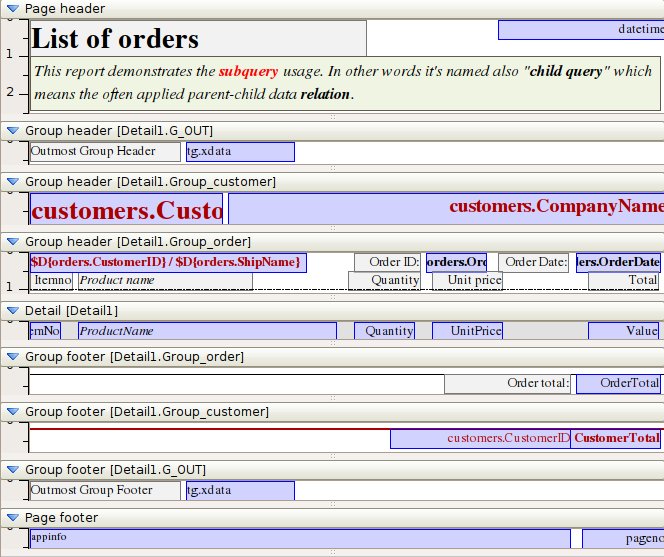
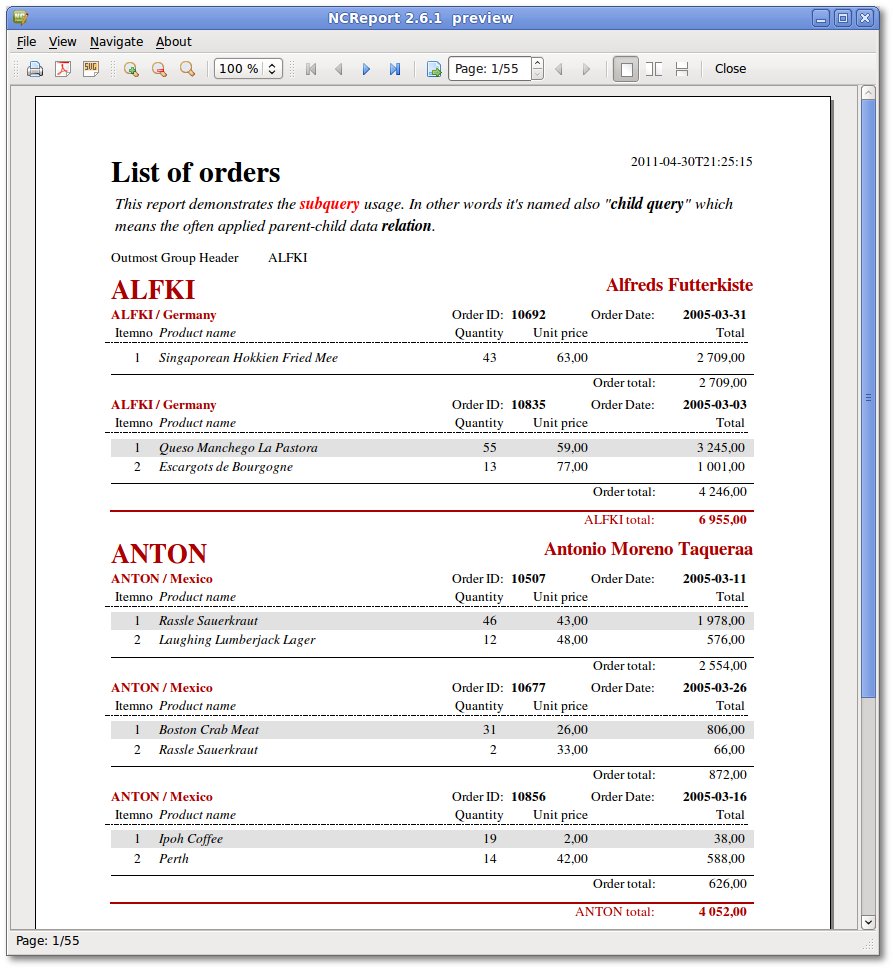
The preview of the example report looks like this:
Changes in version 2.13
The data source relation feature was extended in version 2.13 and became a better supported, general feature. It now also works with Item Models. Reports created with the old sub-query/relation system are not compatible with the new version of the data source relation function.
|
Reports that use the sub-query function and were created with an earlier version of NCReport must be upgraded. |
Changes in the function (make these changes in old reports):
-
The detail’s data source must be the root parent data source.
-
All fields and expressions must include their data source ID, i.e.
datasource.column.
To use the new data source relation system, follow these rules:
-
A data source relation is defined simply by setting the Child datasource (subquery) role and specifying the parent data source ID (as usual).
-
One parent can have only one child (a one-to-many relation).
-
You can specify the Primary key column index of the parent data source. If a primary key column is defined for the parent data source, you can use the
{PK}or{ID}placeholder in the child data source query; it is replaced with the current key value of the parent. (This works in SQL data sources only.) -
When you assign a data source relation to a detail section, always set the root parent data source on the detail. In earlier versions, the last child data source had to be set, but this is outdated since 2.13.
-
For non-SQL data sources, handle the data source updates with the
dataSourceUpdateRequestFKey(const QString& dataSourceID, const QString& foreignKeyValue)signal of the NCReport object, which passes the current foreign key value. (ThedataSourceUpdateRequest(const QString& dataSourceID, const QString& data)signal passes the evaluated data source specification instead.) -
Use
!$D{datasource.isEmpty()}as the print-when expression of a detail section to hide empty child data.