Data Sources
A data source supplies the rows (records) and columns that the report engine iterates over while it renders detail sections, and from which fields, expressions and templates take their values. Every report has at least one data source, and a single report can contain any number of them. Each data source is identified by its ID, which is used to assign it to a detail section and to refer to its columns in expressions.
This chapter is a reference of the data source types that the NCReport engine supports, the options they understand, and the way they are stored in the report definition file.
Data source types
The engine knows the following data source types (NCReportDataSource::DataSourceType). The value in the second column is
the type attribute of the <datasource> element in the report definition.
| Type | type attribute |
Engine class | Data comes from |
|---|---|---|---|
SQL query |
|
|
An SQL |
Text |
|
|
Delimited text (TSV, CSV and similar): static text, a file, an HTTP URL or a parameter. |
XML |
|
|
An XML document in the NCReport data format: static text, a file or an HTTP URL. |
String list |
|
|
A |
Item model |
|
|
A |
Custom |
|
Subclass of |
Any data provided by your own data source class. |
|
The engine also contains a class named |
Common data source properties
The following properties are shared by every data source type. They are stored as attributes of the <datasource> element.
- id
-
The unique identifier of the data source. Detail sections refer to the data source by this ID, and so do the
$D{datasourceID.column}references. - type
-
The data source type:
sql,txt,xml,list,modelorcustom. An unknown value stops loading the report with the error Invalid datasource type. - source
-
The location type, see Location types. Values:
static(default),file,http,ftp,parameter. - openRole
-
The opening role, which controls when the engine opens (or re-opens) the data source, see Opening roles. Values:
begin(default),child,group,sub. - parentID
-
The ID of the parent data source for child data sources, or the ID of the group for data sources opened on group change.
- allowEmpty
-
If
false, a data source opened at the beginning of the report that contains no rows stops the report with the error Data not found in datasource. The older attributeemptyIsForbidden(with the inverse meaning) is still accepted when reading. - enabled
-
Disabled data sources are not opened. If the attribute is missing, the data source is enabled.
- primaryKeyColumn
-
The index of the primary key column, used by data source relations (parent/child data sources).
- briefDesc
-
An optional short description.
- headers
-
An optional comma-separated list of column names. It is used by the string list data source to give names to the columns.
The text content of the <datasource> element depends on the location type: it holds the static data (or the SQL query) for the
Static type, the file name or URL for the File, Http and Ftp types, and the parameter ID for the Parameter type.
Location types
The location type (NCReportDataSource::LocationType) tells the engine where the data or the query specification can be found.
- Static
-
The data (the SQL query, the delimited text, the XML document) is stored directly in the report definition.
- File
-
The data is read from an external file. The element text is the file name.
- Http
-
The data is downloaded from a URL with the engine’s built-in HTTP client (
NCReportHttpClient). The element text is the URL. Used by the Text and XML data sources. - Ftp
-
Listed in the enumeration, but the built-in Text and XML data sources do not implement it: opening such a data source fails.
- Parameter
-
The data is passed in a report parameter. The element text is the parameter ID, and the data itself is added from the application with
NCReport::addParameter(). Used by the Text data source.
Not every type uses every location. The SQL data source executes the query stored in the report definition (Static). The string list and item model data sources always receive their data from the application, so for them only Static is meaningful.
File names are resolved by the engine before use: besides absolute and relative paths, the placeholders {TEMP} (or %TEMP%),
{HOME} (or %HOME%), {CURR}, {ROOT}, {NCREPORT_DIR} and {VAR0}…{VAR9} are replaced, and a relative file name that
does not exist is looked up relative to the directory of the report file. The file name of Text and XML data sources may also
contain parameter references such as $P{datafile}, which are evaluated when the data source is opened.
Opening roles
The opening role (NCReportDataSource::OpenRoles) determines when the data source is opened.
- Beginning of the report (
begin) -
The data source is opened when the report starts. This is the default.
- Child data source (
child) -
The data source is a child of the data source given in
parentID, and it is updated according to the current record of the parent. See the Data Relation system chapter. - Group change (
group) -
The data source is re-evaluated and updated when the group given in
parentIDchanges. - Sub-report iteration (
sub) -
The data source drives the sub-report iteration, see Sub-Report iteration.
Referring to data source columns
In fields, expressions and templates, a data source column is referred to as $D{datasourceID.column}. If the data source ID is
omitted ($D{column}), the data source assigned to the current detail section is used. See the Using references in expressions section of the
Data/Script Expressions chapter for the complete syntax, and the data source functions (row count, current row and similar)
that are also available in expressions.
How the column part is matched depends on the data source type:
| Data source | Column reference |
|---|---|
SQL |
The column (field) name of the query result. |
Text |
If the first row is a column header, the header names. Otherwise |
XML |
The names defined in the |
String list |
|
Item model |
The horizontal header text of the model ( |
Custom |
Whatever the class implements in |
For item models (and for any data source that honors the role argument of value()), a role suffix can be appended to the
column name to read another Qt data role or the header data:
| Suffix | Returned data |
|---|---|
|
|
|
|
|
|
|
|
|
Horizontal header data ( |
|
Horizontal header data ( |
|
Horizontal header data ( |
|
Horizontal header data ( |
|
Horizontal header data ( |
For example, $D{model_ds.price:d} returns the display text of the price column of the current row.
SQL data source
The SQL data source executes an SQL query through Qt’s SQL module (QSqlQuery) and iterates over the result. The query is stored
in the report definition. It may contain parameter references ($P{…}) and data source references ($D{…}); both are
evaluated before the query is executed, which is how parameterized and child (sub) queries are built.
The data source uses either a database connection created by the application (global connection) or its own private connection, built from the parameters stored in the report.
- connection
-
internal(orglobal): the application’s connection is used.external(orprivate): the data source opens its own connection with the parameters below. - connID
-
The connection name, as passed to
QSqlDatabase::addDatabase()in the application. An empty value ordefaultmeans Qt’s default connection. The connection ID may contain parameter references. If the application callsNCReport::setConnectionName(), that connection name overrides the one stored in the report. - driver, host, database, user, password, port
-
The private connection parameters (Qt SQL driver name such as
QMYSQL,QPSQL,QSQLITE,QIBASE,QODBC,QOCI, and so on). If the database name contains{FILE}, the marker is removed and the remaining path is converted to an absolute file path (useful for SQLite database files). - connOpt
-
Connection options passed to
QSqlDatabase::setConnectOptions(). - fwOnly
-
If
true, the query runs in forward-only mode (QSqlQuery::setForwardOnly()). - forceUpdateOnStepBackRel
-
Forces the update of a child data source when stepping backward in a data relation.
<datasource id="product" type="sql" source="static" openRole="begin"
            connection="internal" connID="northwind">SELECT ProductID, ProductName,
UnitPrice FROM products WHERE ProductName LIKE '$P{prodFilt}'</datasource><datasource id="DS" type="sql" source="static" connection="external" connID="interbase"
host="" database="/data/employee.fdb" user="sysdba" password="masterkey"
port="" driver="QIBASE">SELECT * FROM employee ORDER BY job_country</datasource>In C++ the application only has to create the database connection before running the report:
QSqlDatabase db = QSqlDatabase::addDatabase("QMYSQL", "northwind");
db.setHostName("localhost");
db.setDatabaseName("northwind");
db.setUserName("user");
db.setPassword("password");
db.open();

NCReport report;
report.setReportFile("products.ncr");
report.addParameter("prodFilt", "C%");
report.runReportToShowPreview();
Text data source
The text data source (txt) reads delimited text. Each line is one record, and the columns are separated by a delimiter character.
The text can be stored statically in the report, read from a file, downloaded from an HTTP URL, or passed in a report parameter.
- columnDelimiter
-
The column delimiter:
tab(default),comma,semicolon,space,vbar(|) orcustom. - customDelimChar
-
The delimiter character when
columnDelimiter="custom". - hasColumnHeader
-
If
true, the first line contains the column names, and columns can be referred to by these names. Otherwise the columns are namedcol0,col1, … - encoding
-
The text encoding of a data file, for example
UTF-8(applied when the engine is built with Qt 5).
<datasource id="items" type="txt" source="static" openRole="begin"
            columnDelimiter="tab" encoding="UTF-8">1	Item1
2	Item2
3 Item3</datasource><datasource id="customers" type="txt" source="file" columnDelimiter="comma"
hasColumnHeader="true">{CURR}/data/customers.csv</datasource><datasource id="ds1" type="txt" source="parameter" columnDelimiter="tab">data1</datasource>QString data;
data += "1\tChai\t16.0000\n";
data += "2\tChang\t17.0000\n";
report.addParameter("data1", data);XML data source
The XML data source (xml) reads data from an XML document in a simple NCReport data format. The document can be stored
statically in the report, read from a file or downloaded from an HTTP URL. The data source has no type-specific attributes.
The document may contain several data sets. The engine reads only the <datasource> element whose id attribute equals the ID
of the report data source. Inside it, <columns> defines the column names and every <row> element is one record, with one <d>
element per column, in column order. An optional <parameters> block of <d id="…"> elements is read into the data source’s
parameter list (NCReportDataSource::parameters()).
<?xml version="1.0" encoding="UTF-8"?>
<NCReportData>
<parameters>
 <d type="string" id="TransactionNumber">02236412</d>
</parameters>
<datasources>
 <datasource id="xmlds1">
  <columns>
   <column type="string">ProductNumber</column>
   <column type="string">ProductName</column>
   <column type="numeric">NetPrice</column>
  </columns>
  <row>
   <d>CK02214</d>
   <d>Monitor</d>
   <d>199.50</d>
  </row>
 </datasource>
</datasources>
</NCReportData><datasource id="xmlds1" type="xml" source="file" openRole="begin"
allowEmpty="true">{CURR}/data/xmltestdata.xml</datasource>Columns are referred to by the names in <columns>, for example $D{xmlds1.ProductName}.
String list data source
The string list data source (list) iterates over a QStringList that the application adds to the report with
NCReport::addStringList(). Each list item is one record, and the columns are separated by the delimiter character.
- listID
-
The ID of the string list, the same ID that is passed to
addStringList(). - columnDelimiter, customDelimChar
-
The column delimiter, with the same values as for the text data source (default
tab).
<datasource id="sl0" type="list" source="static" columnDelimiter="vbar" listID="sl0"></datasource>QStringList list;
list << "24|Renate Moulding|Desert Hot Springs, CA|1|2008-01-01";
list << "78|Alfred Muller|Miami Beach, FL|1|2008-01-03";
NCReport report;
report.addStringList(list, "sl0");Columns are referred to as col0, col1, … (or 0, 1, …). If the headers attribute of the <datasource> element
contains a comma-separated list of names, the columns can be referred to by these names instead.
Item model data source
The item model data source (model) reads data from any QAbstractItemModel. Each model row is one record. The application adds
the model to the report with NCReport::addItemModel().
- modelID
-
The ID of the item model, the same ID that is passed to
addItemModel(). - useFormatRoles
-
Enables the use of the model’s appearance (formatting) roles. In the Designer: Use model appearance roles.
The text content of the element (in the Designer: Relation Data Specification) is optional. It is evaluated (data source references
are replaced) when the data source is updated in a relation, and the result is emitted with the NCReport::dataSourceUpdateRequest()
signal, so that the application can refill the model for the current parent record.
<datasource id="imds" type="model" source="static" modelID="model1"></datasource>QStandardItemModel *model = new QStandardItemModel(2, 2);
model->setHorizontalHeaderLabels(QStringList() << "id" << "name");
model->setItem(0, 0, new QStandardItem("1"));
model->setItem(0, 1, new QStandardItem("Chai"));
model->setItem(1, 0, new QStandardItem("2"));
model->setItem(1, 1, new QStandardItem("Chang"));
NCReport report;
report.addItemModel(model, "model1");Columns are matched against the model’s horizontal header data, so $D{imds.name} works for the model above; col1 or 1
can be used as well. Role suffixes (see Referring to data source columns) give access to other data roles and to the header.
Custom data sources
A custom data source is your own subclass of the abstract NCReportDataSource class. It has to implement the record navigation
and data access methods: open(), close(), first(), last(), next(), previous(), hasNext(), seek(), size(),
isValid() and both value() overloads. A complete example is shown in the Custom data sources section of the
Using the NCReport API chapter.
There are three ways to connect custom data source objects to a report:
- Adding the object directly
-
Create the object, set its ID with
setID()and add it withNCReport::addCustomDataSource()(or the equivalentNCReport::addDataSource()). When the report definition contains a<datasource>element with the same ID, the engine uses the added object instead of creating a new one. - Data source factory
-
Subclass
NCReportDataSourceFactoryand implementcreateCustomDataSource(const QString& dsID). Set the factory withNCReport::setCustomDataSourceFactory(). The engine calls it for eachcustomdata source of the report that has not been added directly. - Custom data source provider
-
Subclass
NCReportCustomDSProviderand implementcreateCustomDataSource(const QString& dsID, NCReportDataSource::DataSourceType dstype, QObject* parent). Set it withNCReportDef::setCustomDSProvider()onNCReport::reportDef(). When a provider is set, the engine asks it to create every data source of the report, whatever its type, so the provider can, for example, replace the built-in SQL data source with its own implementation.
<datasource id="cds0" type="custom" openRole="begin" source="static">cds0</datasource>TestDataSource *ds = new TestDataSource(); (1)
ds->setID("cds0");
// ... fill the data source ...
NCReport report;
report.addCustomDataSource(ds);
report.setReportFile("customdatasource_demo.xml");
report.runReportToShowPreview();| 1 | TestDataSource is an NCReportDataSource subclass. |
Data sources in the Designer
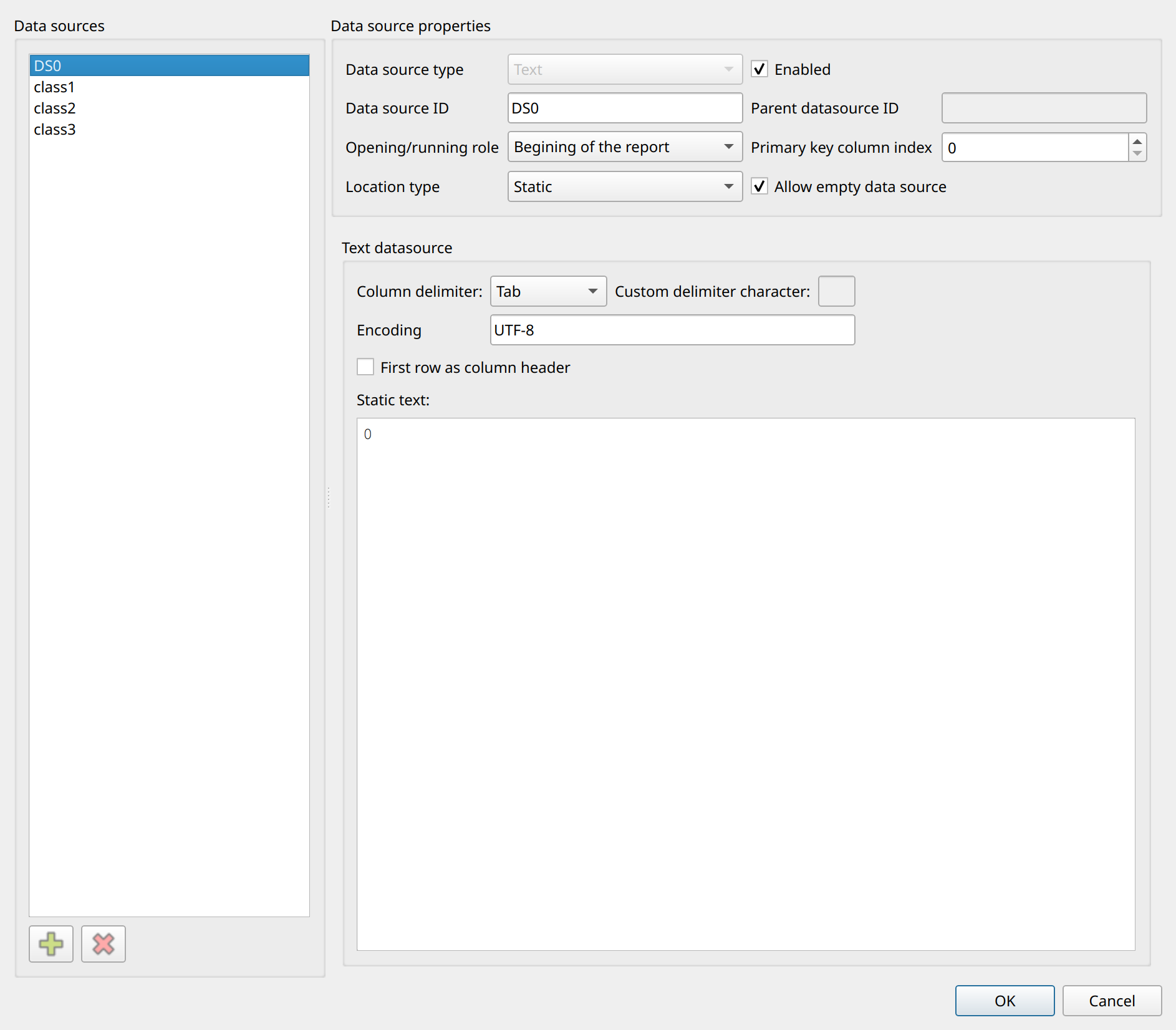
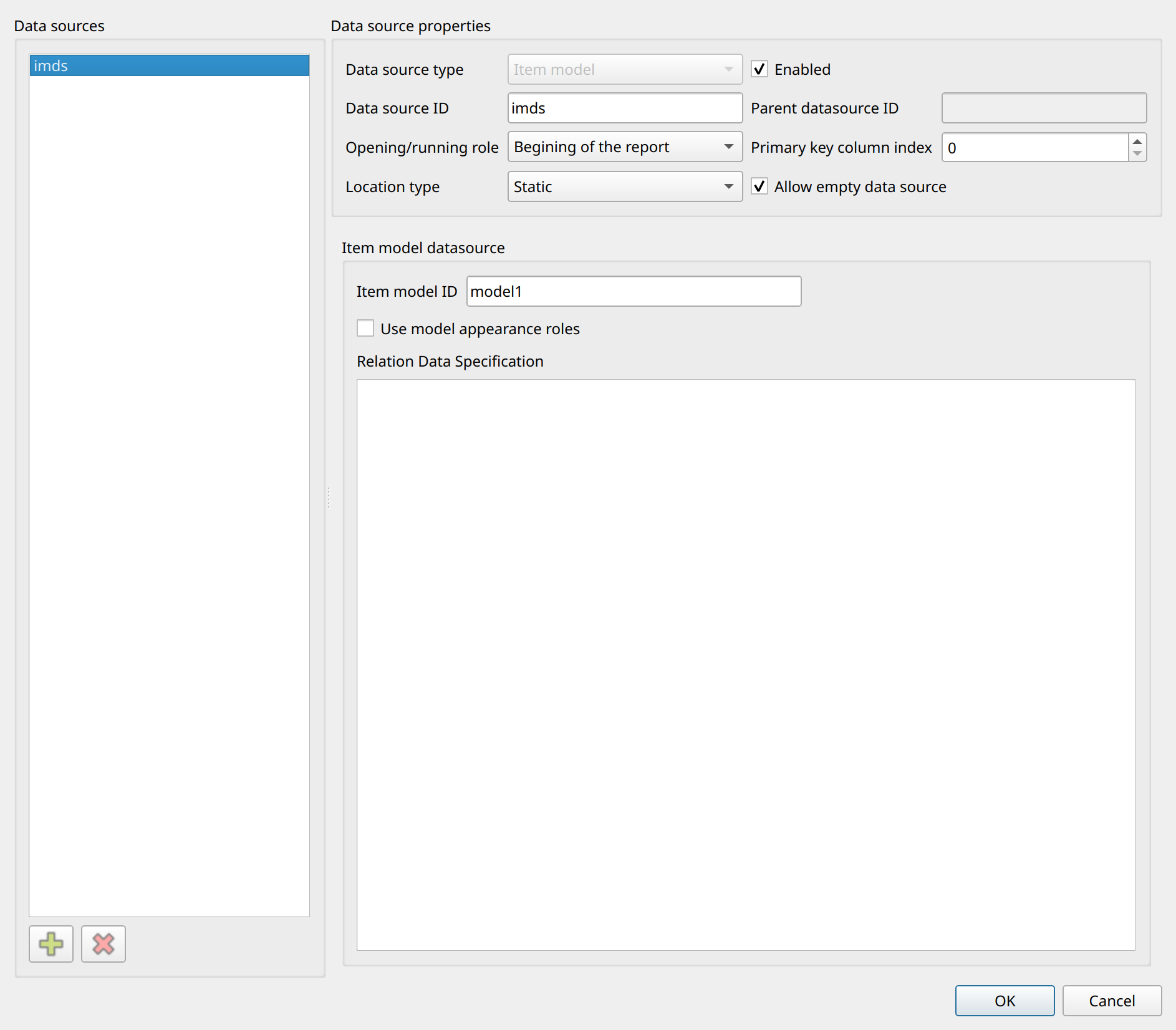
Data sources are managed in the Data source settings dialog (). The list on the left contains the data sources of the report; new ones are added with the Add button, which first asks for the data source type: SQL query, Text, XML, String list, Item model or Custom. The type cannot be changed later.
The upper part of the dialog holds the common properties: Data source type, Data source ID, Opening/running role (Begining of the report, Child datasource (subquery), When group change, Subreport iteration), Location type (Static, File, Http, Ftp, Parameter), File name, Parent datasource, Primary key column index, Allow empty data source and Enabled.
The lower part shows a page specific to the selected type:
- SQL query
-
The SQL Query tab with the Connection Name and the query editor (with Insert Parameter and Test Query buttons), the Query test tab that shows the result of a test run, and the Database connection tab with Connection options, Forward only mode, Force update on stepping backward in relation and Use private database connection, which enables the Private connection parameters (driver, host, database, username, password, port, with a Test button).
- Text
-
Column delimiter, Custom delimiter character, Encoding, First row as column header and the Static text editor.
- XML
-
The Static XML string editor.
- String list
-
String list ID, Column delimiter and Custom delimiter character.
- Item model
-
Item model ID, Use model appearance roles and Relation Data Specification.
- Custom
-
Custom specification, Description and a Columns list.
After the data sources are defined, their columns appear in the Designer’s data source tree, from where they can be dragged into the report sections.