About NCReport in general
A short history
NCReport is a mature software project with over 20 years of development history. Launched in 2002, it originated as a joint project for a Qt3 application before evolving into an independent GPL project. The system was initially conceived to address the need for robust data printing capabilities, a feature that was notably absent from the Qt/C++ programming environment at the time.
In 2007, the project underwent a complete rewrite and became a commercial product. This overhaul, designated version 2.0, adopted a fully object-oriented architecture. The 2.x line has been continuously developed ever since.
What is NCReport?
NCReport is a report generator and report writer tool: a report engine with a GUI designer, primarily for Qt applications, though it is by no means limited to the Qt environment. It enables applications to print data-driven reports, tables, lists, rich text documents, or any other paginated graphical content from one or more data sources. The system consists of two main parts: the report engine and the Designer GUI application. The report engine is also available as a command line executable. The report engine library can be integrated into any Qt application independently of the Designer. NCReport is already used and integrated by a growing community of commercial users and professionals.
Features
NCReport provides the following features and functions:
-
XML-Based Definitions: Reports are defined using flexible XML templates.
-
Metric-Based, Band-Oriented System: Precise control over layout and sections.
-
Diverse Data Sources: Support for SQL databases, Text/CSV, QStringList, QAbstractItemModel, XML, and custom user-defined data source classes.
-
Multiple Output Formats: Screen Preview, Printer, PostScript, PDF, SVG, Image, HTML, Excel (HTML-based), and Plain Text.
-
High-Performance Preview: A dedicated, fast private preview window system.
-
Database Connectivity: Support for both internal and external SQL database connections.
-
Rich Layout Items: Labels (static text), Fields, HTML/Rich Text, Lines, Rectangles, Ellipses, Images, Barcodes, Tables (QTableView / item model), Cross tables, Graphics View content, and Custom Content items.
-
Advanced Pagination: Support for Page Headers/Footers and Report Headers/Footers.
-
Data Grouping: Unlimited nesting levels for data grouping with dedicated group headers and footers.
-
Calculations: Variables for totals, aggregate functions, and system variables.
-
Dynamic Content: Support for static/dynamic images and HTML content.
-
Extensive Barcode Support: Rendering for over 50 barcode types via the integrated Zint library.
-
Scripting & Logic: Template modes, expression evaluation, and script execution within fields.
-
Application Integration: Pass parameters directly from the host application.
-
Compatibility: Pure C (C17) code that builds with Qt5 and Qt6. Earlier releases also supported Qt4.
-
Conditional Formatting: Dynamic formatting for Fields and Labels based on data values.
Why NCReport?
Modern software applications frequently interact with complex data structures and SQL databases. The ability to represent this data through professional, well-formatted reports is a critical requirement for enterprise-grade software.
The NCReport project represents thousands of development hours and benefits from continuous maintenance. By integrating this tool, developers save significant time and resources because they do not need to build custom printing logic from scratch. This is particularly advantageous for C developers using the Qt cross-platform framework. NCReport provides a fully portable, native C solution that scales across platforms.
How NCReport works
What exactly does NCReport do? In a few words, NCReport generates ready-to-print documents from raw data using a template. As a first step, an XML report definition must be created to serve as the template. The definition is a script for the report engine: it describes exactly what content to render, how it should look, where the data comes from, and so on. The report definition can be loaded from a local or remote file or from an SQL database, depending on the report source that is set. The report source is the part of the report engine that loads the report definition from its origin. The Designer is a separate GUI application for creating report XML definitions. When running a report, the report engine first parses the report definition and opens the specified data source(s). If an SQL data source is used, a valid, open SQL database connection is required (unless the data source defines its own private connection). After the data source(s) are successfully opened, the SQL query is run by the report director. The report engine begins to process the data row by row from the data source assigned to the first detail section. While the report is processing, the report director manages the rendering of the different sections and the items inside them. The result is rendered to the specified output, such as a printer, print preview, PostScript, PDF, SVG, image, HTML, Excel (HTML), or text.
Working schema
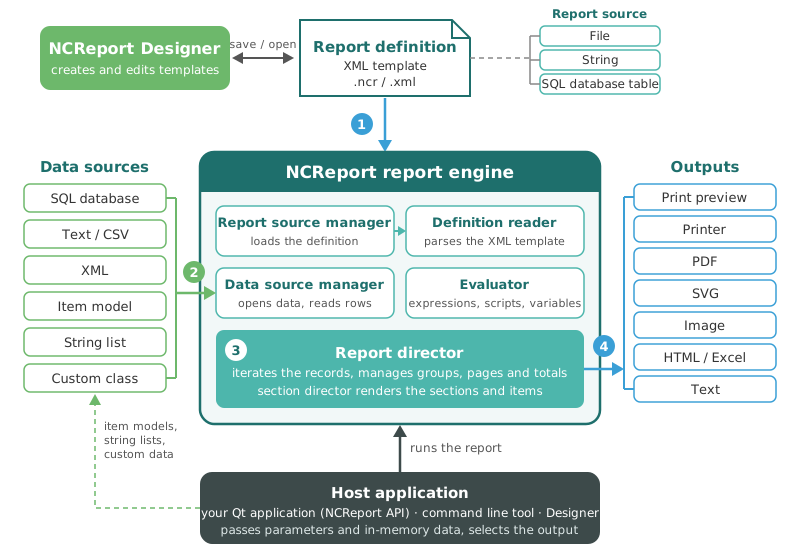
The following diagram shows the main parts of the NCReport system and how a report is produced. The host application (your Qt application, the command line tool, or the Designer) runs the report:
-
The report source manager loads the report definition from a file, a string, or an SQL database table, and the definition reader parses the XML template.
-
The data source manager opens the data sources defined in the report and reads their records row by row.
-
The report director iterates the records, manages groups, page breaks, and totals, and the section director renders the sections and their items. Expressions, scripts, and variables are calculated by the evaluator.
-
The rendered pages are written to the selected output: the print preview, a printer, a PDF, SVG, or image file, HTML, Excel (HTML), or plain text.
Report template file
NCReport uses the Extensible Markup Language (XML) format for report definitions. XML is
a universal, standard file format, which makes report definition templates easy to read
and process, both for humans and for other software. The Designer saves report definitions with the .ncr or .xml file extension.